Author: Daniel Jordan Viray
Step by Step Guide
May 26, 2026 · Autonomy & Mapping · by Daniel Jordan Viray
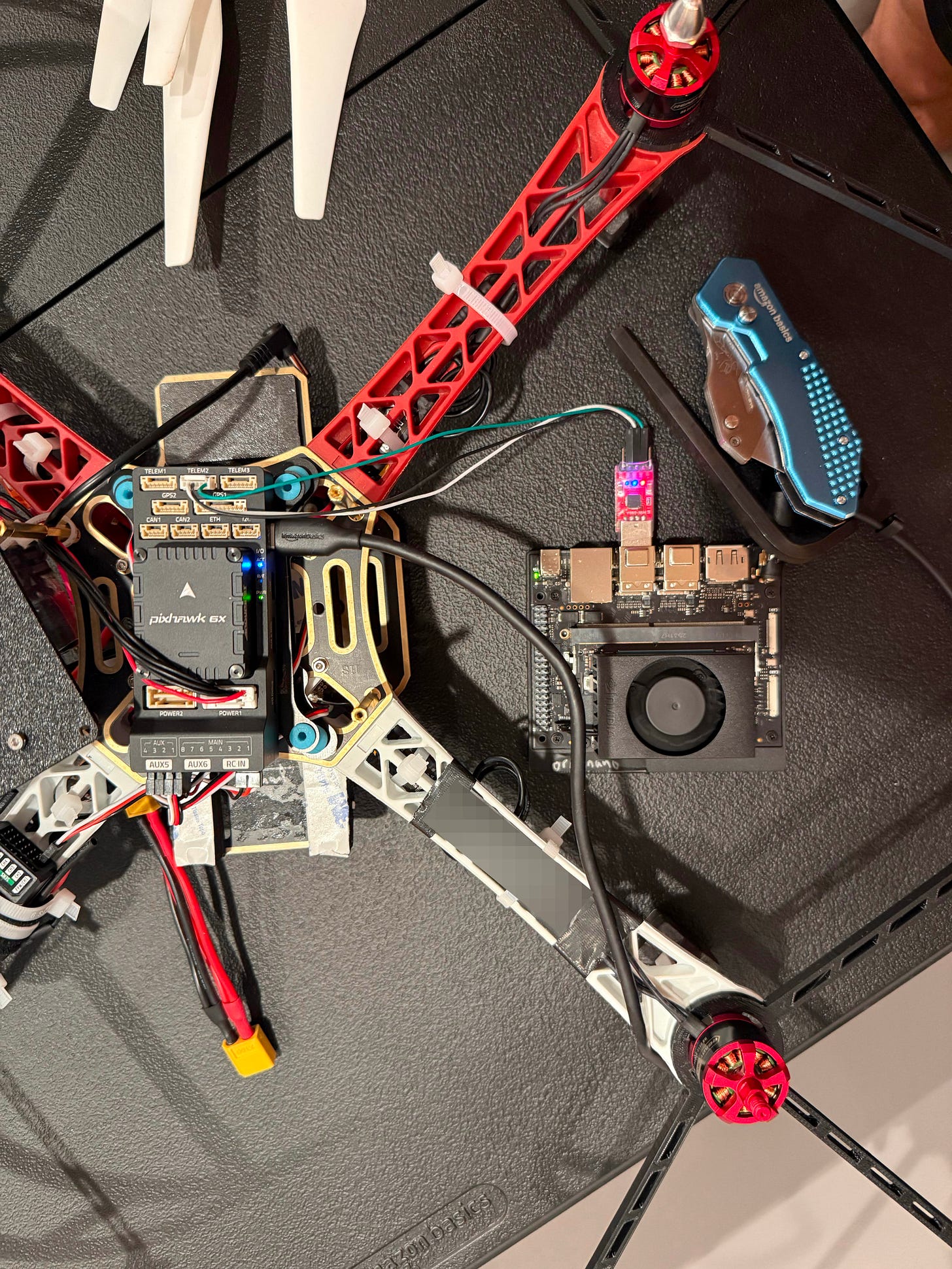
The objective of this session was to prove that the companion computer could successfully connect to and control the flight controller.
How I did it:
Physically connect the flight controller to the Jetson Orin Nano.
FC Telem 2 ports (only Tx, Rx, and GND pins). (Only pins 2,3,6 are relevant). Read pins left to right wight flight controller facing forward. Other pins are not needed - and should not be used.
Needs JST to DuPont wiring connection. Adapter/wires available on Amazon.
Connect wires to CP2102 USB-to-UART adapter. The USB adapter has GND, Tx, and Rx pins labelled. Note that GND <> GND, Tx <> Rxd, Rx <> Txd to/from flight controller.
Configure the correct parameters on PX4 using QGroundControl. Must reboot FC for configurations to take effect.
Mav_1_Config = Telem2 (was set to Disabled by default) - this tells the FC to output data from the Telem2 port.
Mav_1_mode = Onboard (will only appear after mav_1_config is configured properly)
Ser_Tel2_Baud = 921600 (will only appear after mav_1_config is configured properly)
Check that there is raw data flowing between FC and Companion Computer:
sudo apt install -y screen
sudo screen /dev/ttyUSB0 921600
Add dialout group permission settings; otherwise pymavlink and mavros will both fail. May require reboot to take effect.
sudo usermod -a -G dialout $USER
Install pymavlink and do a heartbeat test - to test that the FC and computer can communicate over Mavlink (the language that the flight controller speaks).
pip3 install --user pymavlink pyserial
heartbeat.py
from pymavlink import mavutil
master = mavutil.mavlink_connection(’/dev/ttyUSB0’, baud=921600)
master.wait_heartbeat()
print(f”Heartbeat from system {master.target_system}, component {master.target_component}”)
Install MAVROS - to test if FC can communicate with the computer via Mavlink and ROS (MAVROS is like the translator between Mavlink and ROS)
sudo apt update
sudo apt install -y ros-humble-mavros ros-humble-mavros-extras ros-humble-mavros-msgs
sudo /opt/ros/humble/lib/mavros/install_geographiclib_datasets.sh
Launch Mavros
ros2 launch mavros px4.launch fcu_url:=”serial:///dev/ttyUSB0:921600”
Verify Mavros connects. Expect “connected: true”.
ros2 topic echo /mavros/state --once
Arm/disarm motors via ROS command — make sure that flight controller and battery is plugged in.
ros2 service call /mavros/cmd/arming mavros_msgs/srv/CommandBool “{value: true}”
ros2 service call /mavros/cmd/arming mavros_msgs/srv/CommandBool “{value: false}”
flight controller will auto disarm if there are no commands after the arming.
This session proved that the companion computer can successfully connect to and control the flight controller.