
Author: Daniel Jordan Viray
June 22, 2025 · Shipping Models · by Daniel Jordan Viray
Objective here is to deploy a deep learning model onto the web using HuggingFace and Gradio. I've already trained a deep learning model (.pkl) on Google Colab and downloded it to my local env.
# import libraries
from fastai.vision.all import *
import gradio as gr
Test that I can display downloaded sample images. These will be example images that feed into the model and web app:
# display image of car
car_path = '/content/drive/MyDrive/AI Projects/gradio_model_deployment_1/car.jpg'
im_car = PILImage.create(car_path)
im_car.thumbnail((192,192))
im_car
# display image of bike
bike_path = '/content/drive/MyDrive/AI Projects/gradio_model_deployment_1/bike.jpg'
im_bike = PILImage.create(bike_path)
im_bike.thumbnail((192,192))
im_bike

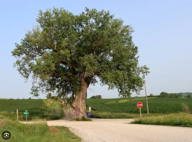
# display image of tree
tree_path = '/content/drive/MyDrive/AI Projects/gradio_model_deployment_1/tree.jpg'
im_tree = PILImage.create(tree_path)
im_tree.thumbnail((192,192))
im_tree
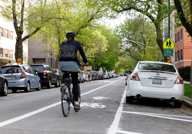
# display image of all three - (i.e., ambigious)
all_path = '/content/drive/MyDrive/AI Projects/gradio_model_deployment_1/all.jpg'
im_all = PILImage.create(all_path)
im_all.thumbnail((192,192))
im_all
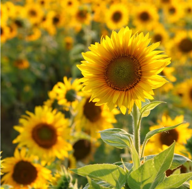
# display image of flower
flower_path = '/content/drive/MyDrive/AI Projects/gradio_model_deployment_1/flower.jpg'
im_flower = PILImage.create(flower_path)
im_flower.thumbnail((192,192))
im_flower
Import deep learning model:
# import previously trained model (.pkl)
learn = load_learner('/content/drive/MyDrive/AI Projects/gradio_model_deployment_1/export.pkl')
/usr/local/lib/python3.11/dist-packages/fastai/learner.py:455: UserWarning: load_learner` uses Python's insecure pickle module, which can execute malicious arbitrary code when loading. Only load files you trust.
If you only need to load model weights and optimizer state, use the safe `Learner.load` instead.
  warn("load_learner` uses Python's insecure pickle module, which can execute malicious arbitrary code when loading. Only load files you trust.\nIf you only need to load model weights and optimizer state, use the safe `Learner.load` instead.")
Apply model on sample images to return probabilities of image classification:
learn.predict(im_car)
# returns: ('prediction', 'tensor position', 'probability(bike, car, tree)')
('car', tensor(1), tensor([1.3583e-06, 1.0000e+00, 6.1913e-09]))
learn.predict(im_bike)
('bike', tensor(0), tensor([9.9999e-01, 7.5860e-06, 1.0868e-07]))
learn.predict(im_tree)
('tree', tensor(2), tensor([0.1054, 0.0544, 0.8402]))
learn.predict(im_all)
('car', tensor(1), tensor([4.7532e-02, 9.5226e-01, 2.1252e-04]))
Create function that applies model, for use in Gradio:
# gradio wants dictionary of categories
# and probablities associated with each one (must be float). Gradio cannot handle numpy or tensors
categories = ('bike', 'car', 'tree')

def classify_image(img):
  pred, idx, probs = learn.predict(img)
  return dict(zip(categories, map(float,probs)))

# map(float, probs) converts the probabilities from tensors to plain Python floats (which are easier to work with or print).

# zip(categories, ...) pairs each class label from your categories list (['bike', 'car', 'tree']) with the corresponding probability.

# dict(...) turns those pairs into a dictionary.

# So if the probabilities are [0.05, 0.90, 0.05], the return value will be:
# {'bike': 0.05, 'car': 0.90, 'tree': 0.05}
# test classify_image() function
classify_image(im_car)
{'bike': 1.358293275188771e-06,
 'car': 0.9999986886978149,
 'tree': 6.191251067377834e-09}
Build a web app interface using Gradio:
# build a simple image classification demo where a user can upload or click example images, and model predicts the label using classify_image() function

# input PIL images
image = gr.Image(height=250,width=250)

# Create a label output component that displays the model's predictions.
# It shows the predicted class and probabilities for all classes in a clean format.
# Gradio parses the output from the classify_image() function, a dictionary of categories and probabilities
label = gr.Label()

# Add clickable examples to the interface.
examples = [car_path, bike_path, tree_path, all_path, flower_path]

# create gradio interface
# fn=classify_image: The function to call when the user inputs an image.
intf = gr.Interface(fn=classify_image, inputs=image, outputs=label, examples=examples)

# launch Gradio interface
intf.launch(inline=False)
It looks like you are running Gradio on a hosted a Jupyter notebook. For the Gradio app to work, sharing must be enabled. Automatically setting `share=True` (you can turn this off by setting `share=False` in `launch()` explicitly).

Colab notebook detected. To show errors in colab notebook, set debug=True in launch()
* Running on public URL: https://96a9364e817450727a.gradio.live

This share link expires in 1 week. For free permanent hosting and GPU upgrades, run `gradio deploy` from the terminal in the working directory to deploy to Hugging Face Spaces (https://huggingface.co/spaces)
Code needed to create script / app on HuggingFace:
# import libraries
from fastai.vision.all import *
import gradio as gr

# import previously trained model (.pkl)
learn = load_learner('/content/drive/MyDrive/AI Projects/gradio_model_deployment_1/export.pkl')

# gradio wants dictionary of categories
# and probablities associated with each one (must be float). Gradio cannot handle numpy or tensors
categories = ('bike', 'car', 'tree')

def classify_image(img):
  pred, idx, probs = learn.predict(img)
  return dict(zip(categories, map(float,probs)))

# build a simple image classification demo where a user can upload or click example images, and model predicts the label using classify_image() function

# input PIL images
image = gr.Image(height=250,width=250)

# Create a label output component that displays the model's predictions.
# It shows the predicted class and probabilities for all classes in a clean format.
# Gradio parses the output from the classify_image() function, a dictionary of categories and probabilities
label = gr.Label()

# Add clickable examples to the interface.
examples = [car_path, bike_path, tree_path, all_path, flower_path]

# create gradio interface
# fn=classify_image: The function to call when the user inputs an image.
intf = gr.Interface(fn=classify_image, inputs=image, outputs=label, examples=examples)

# launch Gradio interface
intf.launch(inline=False)
I downloaded the .py script locally and then pushed it to HuggingFace via Git.